


Best Email Assistant in 2026(Tiko Mail vs Fyxer AI vs SaneBox vs Superhuman)
There are more email tools than ever. The problem is not finding one. The problem is figuring out which one actually fits the way you work.
There are now more email tools than ever. Some sort your inbox. Some draft replies. Some replace your entire email client with something new. The problem is not finding one. The problem is figuring out which one actually fits the way you work.
We compared four popular options side by side: Tiko Mail, Fyxer AI, SaneBox, and Superhuman. This is not a rankings list. This is a breakdown of what each tool does, what it costs, and who it is best for, so you can make the call yourself.
In this guide:
- 1. The quick pricing breakdown
- 2. What each tool actually does
- 3. Fyxer AI: the all-in-one bundle
- 4. SaneBox: the filtering veteran
- 5. Superhuman: the power user inbox
- 6. So which one should you pick?
The Quick Pricing Breakdown
What you will actually pay each month
Before diving into features, here is the cost picture. This matters because most tools gate their best features behind higher tiers.
| Tool | Starting price | Full price | What you get |
|---|---|---|---|
| Tiko Mail | $10/mo | $10/mo | Everything. One plan. |
| Fyxer AI | $30/mo | $50/mo | Meetings, docs, and chatbot at Pro tier |
| SaneBox | $9/mo | $40/mo | Pick 2, 6, or all features per tier |
| Superhuman | $30/mo | $40/mo | Business tier adds team features |
The range is wide. And the "starting price" can be misleading when the features you actually need live on a higher tier. Keep this in mind as we go through each one.
What Each Tool Actually Does
Core features, compared honestly
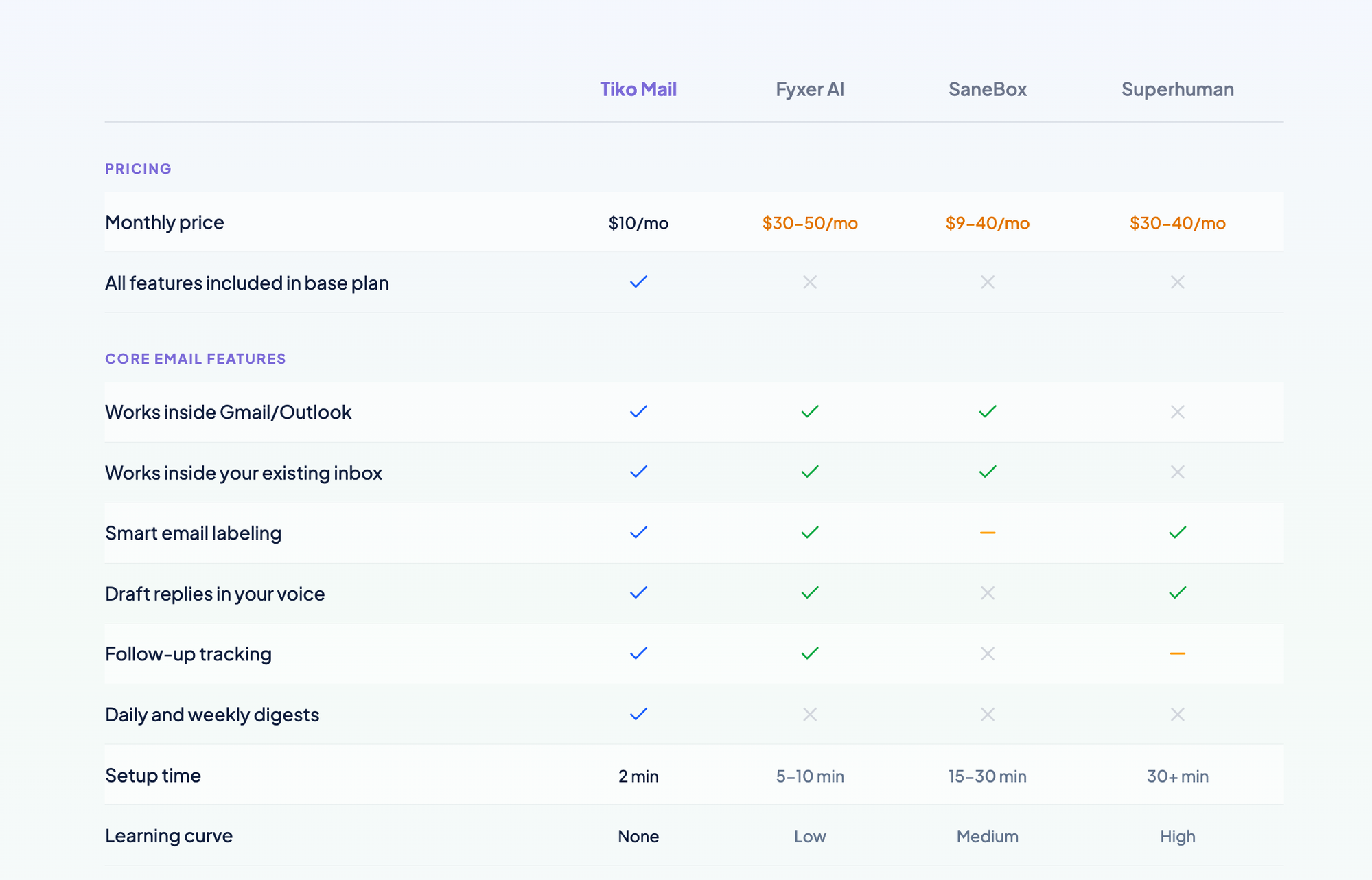
Every tool on this list promises to "fix" email. But they approach the problem from different angles. Here is what the core feature set looks like:
| Feature | Tiko | Fyxer | SaneBox | Superhuman |
|---|---|---|---|---|
| Works inside Gmail/Outlook | ✓ | ✓ | ✓ | ✗ |
| Smart email labeling | ✓ | ✓ | Basic | ✓ |
| Draft replies in your voice | ✓ | ✓ | ✗ | ✓ |
| Follow-up tracking | ✓ | ✓ | ✗ | Basic |
| Daily and weekly digests | ✓ | ✗ | ✗ | ✗ |
| All features in base plan | ✓ | ✗ | ✗ | ✗ |
The important thing to notice: most tools check most of the same boxes. The difference is in how much you pay to get those checks, and how much you need to change about the way you already work.
RelatedWhy Gmail Doesn't Have "Folders"(And How to Actually Organize Your Inbox)Fyxer AI: The All-in-One Bundle
Email, meetings, documents, chatbot
Fyxer charges $30/month for their Starter plan and bundles in meeting recording, document management, and a chatbot. Want meetings and multi-inbox support? That is $50/month.
If you genuinely need meeting transcription and document tools baked into your email workflow, Fyxer is built for that. The question is whether you actually need those things, or whether your calendar app and Google Docs already cover them.
Most of those extras duplicate tools you already have. And the core email features (labeling, drafting, triage) are available elsewhere for a third of the price. If email is the bottleneck you are trying to fix, paying $30-50/month for meeting notes and chatbots you may never use is a hard sell.
Best for: People who want email, meetings, and documents managed by one tool and are willing to pay $30-50/month for the bundle.
SaneBox: The Filtering Veteran
Simple filtering, tiered feature bundles
SaneBox has been around for years and does one thing well: filter low-priority email into a separate folder. Their cheapest plan ($9/month) gives you exactly two features. Want more? That is $15/month for six, or $40/month for everything.
The pricing model is the challenge here. You are constantly evaluating which features you need, and the "pick 2" or "pick 6" structure means you might end up paying for a higher tier just to unlock one more thing. And even at the top tier, SaneBox does not draft replies or track follow-ups.
SaneBox sorts email into "important" and "not important." That is useful, but it is binary. There is no distinction between an email you need to respond to, one you are waiting on, and one that is purely informational. Tiko labels across up to 11 categories (Respond, Follow-up, Awaiting, FYI, Done, Notifications, Meetings, Marketing, and more), which gives you a much clearer picture of what actually needs your attention.
Best for: People who only need basic email filtering and are comfortable with the tiered pricing model. Not ideal if you want reply drafts or detailed categorization.
Superhuman: The Power User Inbox
A completely new email experience
Superhuman is a polished, powerful email client that many people love. It is also a completely separate app that replaces your existing inbox with a new interface and a new way of working. For people who want that, it is great.
The trade-off is commitment. At $30-40/month, you are paying 3-4x what Tiko costs. And you are moving your entire email workflow into a new application. That means learning a new interface, adjusting your habits, and being locked into Superhuman for the experience to work.
For power users who live in their inbox and want every possible optimization, Superhuman delivers. But if you just want your current Gmail or Outlook to work better without changing anything, it is more tool than you need.
Best for: Power users who want a premium, standalone email experience and are comfortable investing the time and money into a new workflow.
So Which One Should You Pick?
The honest answer
It depends on what you are optimizing for:
- If you want an all-in-one productivity suite with meetings and documents: Fyxer, but expect to pay $30-50/month.
- If you only need basic filtering and want to keep costs low: SaneBox at $9/month could work, though the tiered model gets confusing fast.
- If you want a premium, standalone email client and are willing to switch apps entirely: Superhuman at $30-40/month.
- If you want your existing inbox to just work better without installing anything new, learning anything new, or paying more than you need to: that is what Tiko was built for. $10/month, everything included.
We built Tiko because we thought the email assistant space was overcomplicating things. You should not need a $50/month subscription to get your inbox under control. You should not need to learn a new app. You should not need to pick between confusing plan tiers.
You should be able to open Gmail or Outlook tomorrow morning and have your emails already sorted, your replies already drafted, and your follow-ups already tracked. That is it. That is the whole pitch.
What Tiko Does for $10/month
No tiers, no add-ons, no surprises. One plan with everything included.
Smart Labeling Across 11 Categories
Respond, Follow-up, Awaiting, FYI, Done, Notifications, Meetings, Marketing, and more. Not just "important" vs "not important."
Reply Drafts in Your Voice
Tiko drafts responses that sound like you wrote them. Review, tweak if needed, and send. Your contacts will never know the difference.
Follow-up Tracking and Daily Digests
Never lose track of threads you are waiting on. Get a daily summary of what happened and what needs your attention, without checking your inbox every 20 minutes.
2 weeks free, no credit card needed
Your Choice
Option 1: Keep Evaluating
Compare feature matrices, read more reviews, sign up for trials you forget to cancel. Eventually pick something.
Option 2: Try Tiko for FreeRecommended
30 seconds to set up. 2 weeks free. No credit card. If it works, keep it. If not, your inbox goes back to normal with zero cleanup.
- ✓ Works inside Gmail and Outlook
- ✓ All features included for $10/mo
- ✓ No new app to install or learn
2 weeks free. 30 seconds to set up. No credit card required.