

How to Stop Cold Emails from Burying Your Real Work(And Why AI Made the Problem 10x Worse)
Your inbox is full of pitches from people you have never met, written by AI tools you have never heard of. Here is how to take it back.
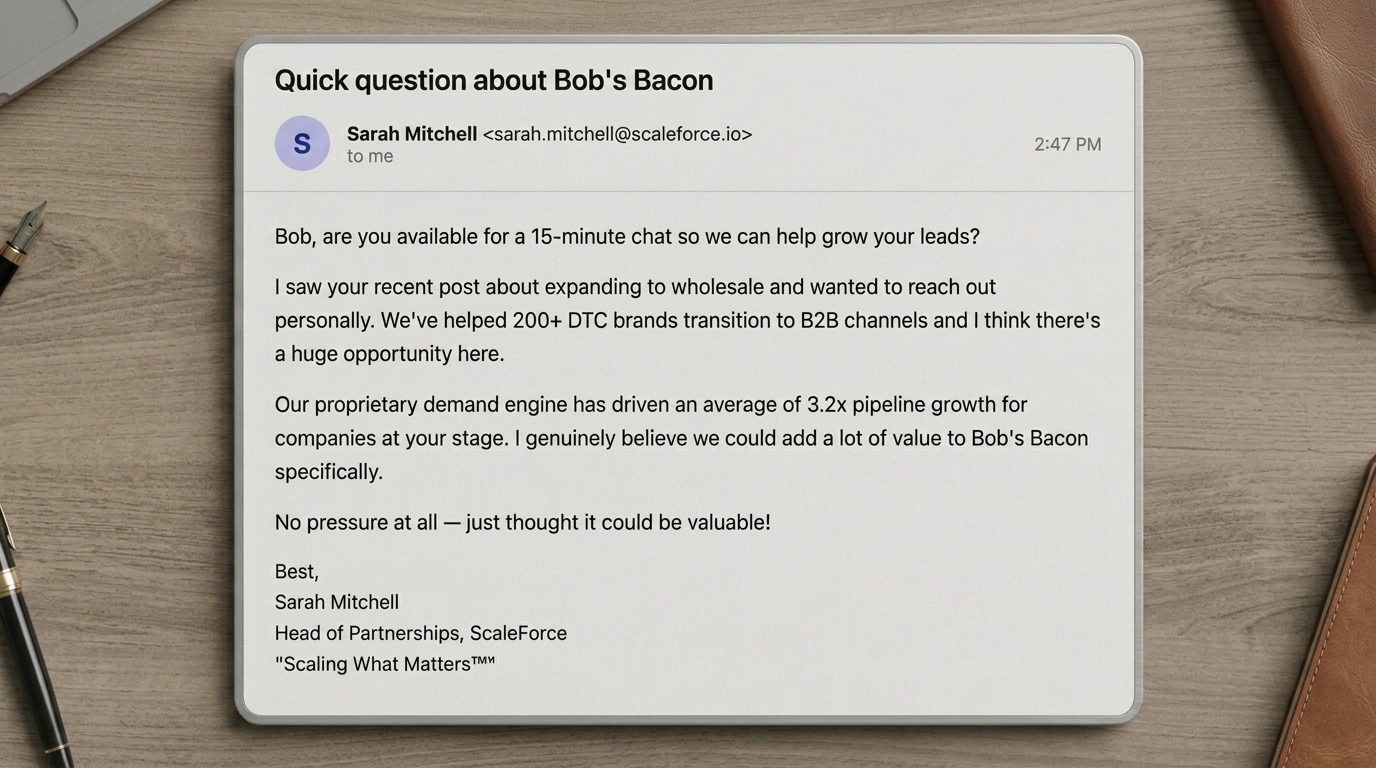
Cold outreach has always existed. What changed is that AI writing tools and automation platforms made it absurdly cheap to send thousands of personalized emails per day. The people filling your inbox are not typing those messages. A script is pulling your name, your company, your job title, maybe even your latest LinkedIn post, and generating something that looks handwritten. It is not. And you are paying for it with your attention.
This post explains why the problem got so much worse, why your spam filter and your email tools cannot keep up, and how to set up a system that triages cold emails automatically so they never interrupt your actual work.
In this guide:
- 1. Why cold email volume exploded
- 2. Why spam filters and email tools cannot catch them
- 3. Tiko Mail's Cold Outreach label
- 4. The batch-review workflow that saves your mornings
Why Cold Email Volume Exploded
The tools got cheaper. Your inbox got louder.
Three years ago, sending a personalized cold email meant a human had to research you, write a message, and hit send. That capped the volume naturally. A salesperson could realistically send 30-50 emails a day if they were fast.
Today, platforms like Apollo, Instantly, and Smartlead plug into AI models that generate unique, personalized messages at scale. One person can now send 500+ emails a day that each reference the recipient's company, role, recent activity, and industry. The emails are grammatically correct, conversational, and formatted like something a real colleague might send. They pass the eye test for about three seconds before you realize nobody you know would open with "I noticed your team just raised a Series B."
Look familiar?
You have seen a hundred of these. The names change, the pitch changes, but the pattern is always the same: a stranger who pulled your info from LinkedIn, ran it through an AI writing tool, and scheduled it through an automation platform. And Marcus's "following up" email? He never sent a first one.
The result is a flood. If your email address is attached to a company domain and your name appears anywhere public, you are a target. And the volume is only going up because the economics keep getting better for the sender.
Why Your Email Tools Cannot Catch Them
Spam filters were not built for this
Gmail and Outlook spam filters are built to catch mass-blast junk: phishing, scams, bulk marketing from sketchy domains. Modern cold outreach does not trigger any of those signals. The emails come from real domains with proper authentication. The sender is a real person at a real company. The content is unique per recipient. By every technical measure, these are legitimate one-to-one emails.
You can try building manual filters, but it is a losing game. There is always a new sender, a new domain, a new subject line pattern. You would need to create a new rule every day and still miss most of them.
And here is the frustrating part: popular email tools like Superhuman, Fyxer AI, and SaneBox do not solve this either. They will sort your newsletters, flag your important emails, and help you draft replies faster. But none of them have a dedicated system for identifying and routing cold outreach. Sales pitches from strangers still land right next to emails from your team, your clients, and the people you actually need to respond to. You end up spending the same mental energy sorting through them yourself.
RelatedBest Email Assistant in 2026(Tiko Mail vs Fyxer AI vs SaneBox vs Superhuman)Tiko Mail's Cold Outreach Label
Cold emails get labeled and routed before you see them
Learn more about Tiko's Cold Outreach label and how it works.
Tiko Mail classifies every incoming email into one of 12 label categories, and one of those labels is Cold Outreach. Sales pitches, partnership proposals, recruiter outreach, investor emails from strangers, job seekers networking cold, and every variation of "are you available for a quick call" from someone you have never met all get caught and labeled automatically.
The labeling is highly accurate across all the tricks cold emailers use to get past your defenses. Hyper-personalized emails that reference your company and your LinkedIn posts? Labeled. Emails phrased as a direct question to make you feel like you need to reply? Labeled. Fake "follow-ups" that pretend there was a prior conversation? Labeled.
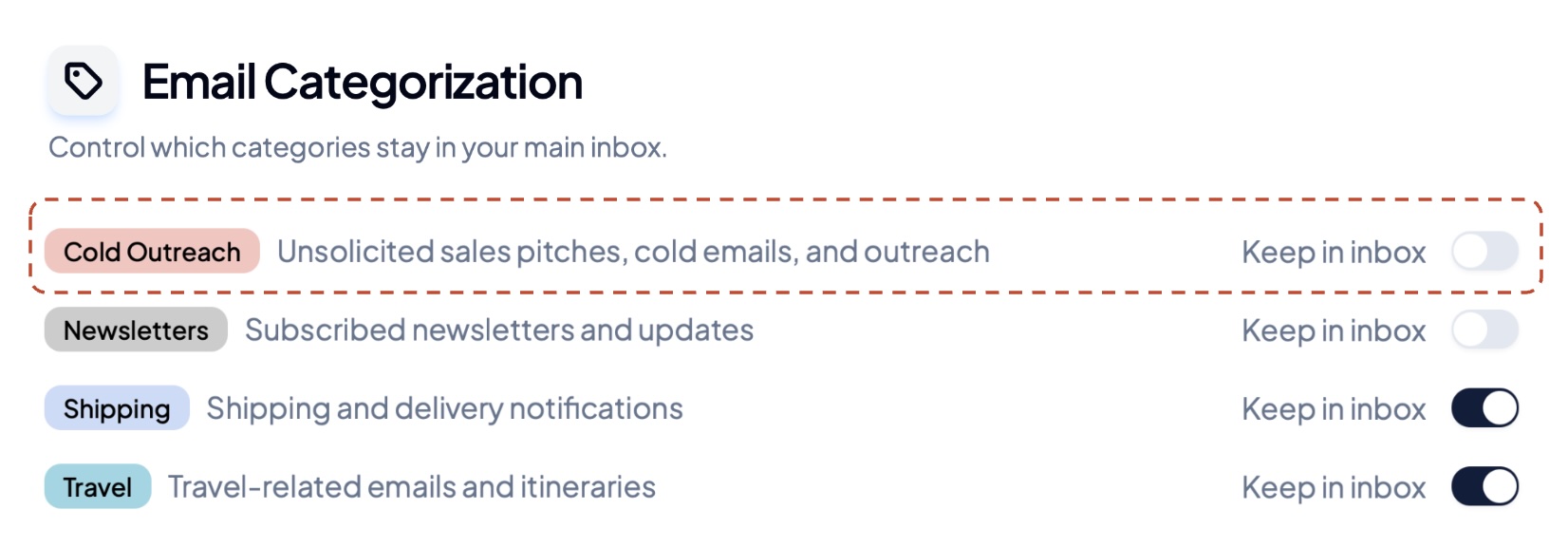
Once labeled, the recommended setup is to have Cold Outreach skip your inbox entirely. You control this with a single toggle in Tiko's settings. The emails land in a clean, separate label in Gmail (or category in Outlook) where you can review them whenever you want. They are not deleted, not buried, just out of your way until you choose to look.
What You Get with Tiko's Cold Outreach Label
Connect your Gmail or Outlook. Cold outreach gets labeled and routed before you open your email.
Cold Outreach Labeled and Archived
Sales pitches, partnership proposals, recruiter outreach, and investor emails from strangers all get labeled Cold Outreach and skip your inbox. Review them on your schedule.
Follow-Ups Handled Automatically
When a cold emailer sends a second or third follow-up, Tiko catches those too. The entire thread gets the same treatment.
11 Other Labels for Everything Else
Cold Outreach is one of 12 labels Tiko applies. Respond, Follow-up, Awaiting, FYI, Done, Notifications, Meetings, Marketing, Shipping, Travel, and Newsletters all get sorted automatically.
2 weeks free, no credit card needed
The Batch-Review Workflow
One check per day instead of fifteen interruptions
The point is not to ignore cold emails forever. Some of them are genuinely relevant. A recruiter with a great role, a potential partner, a vendor you actually need. The point is to review them on your terms instead of having them mixed in with emails from your team, your clients, and your actual work.
Here is a sample workflow for Tiko users to settle into:
- Morning: Open your inbox. Focus only on emails labeled Respond, Follow-up, or FYI are there. Ignore marketing, cold outreach and other distractions -- just enjoy your coffee and stay focused.
- End of day: Open the Cold Outreach label. Scan through in two minutes. Reply to anything worth replying to, and ignore the rest.
- If you reply: Tiko moves that thread out of Cold Outreach. Future emails in that conversation show up in your inbox normally.
You go from getting pulled out of focus fifteen times a day by pitches you did not ask for, to spending two minutes at a time you choose. The emails are still there. You just stopped letting strangers decide when you read them.
RelatedHow to Mark All Gmail as Read(And Why It Doesn't Actually Fix Your Inbox)Your Choice
Option 1: Keep Sorting Manually
Read every email, decide if it is real or a pitch, create filters that break next week, repeat tomorrow.
Option 2: Let Tiko Handle ItRecommended
Cold outreach gets labeled and archived automatically. You review it when you want to, not when a stranger decides to email you.
- ✓ Cold Outreach label that skips your inbox
- ✓ 12 total labels for full inbox organization
- ✓ Works inside Gmail and Outlook
Free trial. 30 seconds to set up. No credit card required.